
Federal bid workspace for small contractors
From federal solicitation to submission-ready bid—without the tool chaos.
GovBidAgent keeps the opportunity, solicitation files, requirements, pricing, partners, proposal, and final package connected in one source-grounded workspace.
Plans from $99/month · No sales call required · Final pricing and submission stay with you.
✓ Public SAM.gov opportunity data✓ Source-linked bid analysis✓ Submission package builder
01 Discover→02 Analyze→03 Price→04 Draft→05 Package
Real production workflow
One pursuit recordOpportunity, files, analysis, pricing and proposal
Human-controlled finish linePricing, signatures & submission stay with your team
Without a pursuit systemSAM.gov + downloads + spreadsheets + separate AI chats + proposal docsContext gets rebuilt as the bid moves from research to response.
With GovBidAgentOne connected pursuit from opportunity to packageRequirements, pricing, partners, proposal work, and readiness stay tied to the same bid.
See the real product
A working pursuit workspace—not a promise on a landing page.
GovBidAgent's production workflow connects federal opportunity discovery, source documents, bid analysis, pricing work, proposal preparation, Operations Board tracking, and the final submission package.
Production testedCore pursuit workflow is exercised end to end before release.Source groundedAnalysis depends on the solicitation and attached source material.Human controlledYour team keeps final authority over pricing, commitments, and submission.
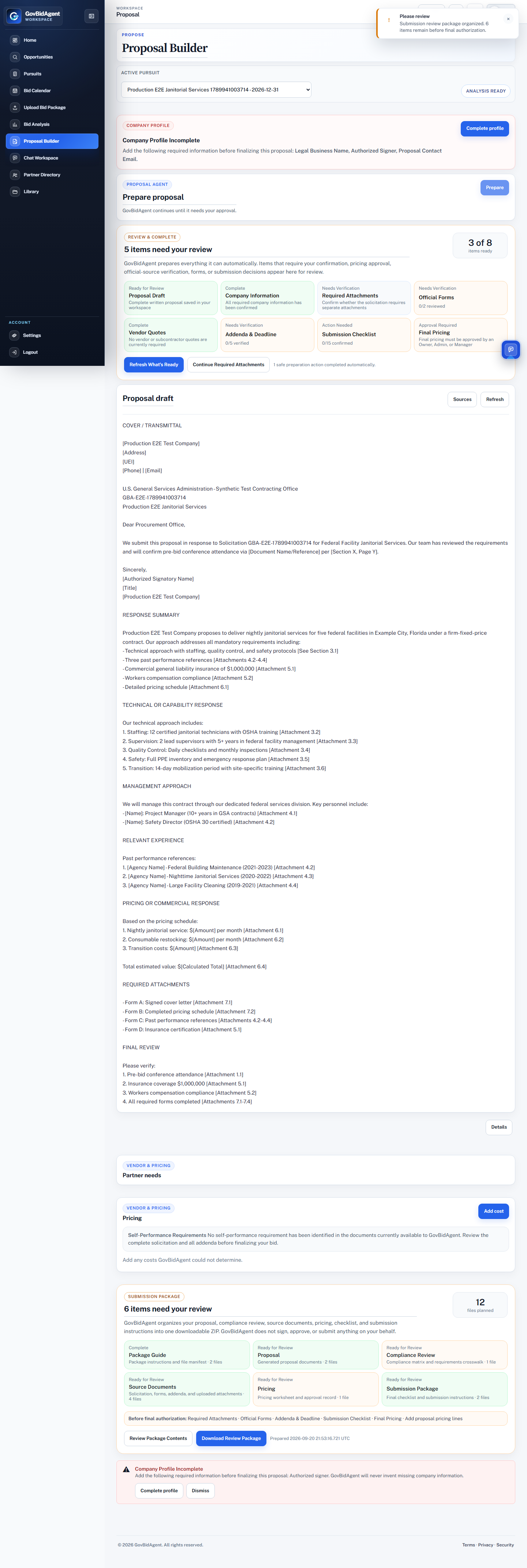 Real production workspace · open the full workflow
One workspace for the complete pursuit
Keep the bid connected instead of rebuilding context in every tool.
Federal contractors often move among opportunity pages, downloaded solicitation files, inboxes, spreadsheets, separate AI chats, and proposal documents. GovBidAgent keeps the pursuit record, source material, analysis, actions, pricing work, partners, and proposal preparation connected.
Purpose-built for federal pursuits
Why not just use ChatGPT, Gemini, or Claude?
They are powerful general AI assistants. GovBidAgent does not win by pretending the model is magically smarter. It wins by making the federal-pursuit workflow persistent, source-linked, amendment-aware, and operational by default.
Powerful intelligence. You build the operating system around it.
- Excellent research, reasoning, file analysis, and writing
- You provide or rebuild the bid context and workflow
- Great for flexible one-off work across many domains
The intelligence lives inside the pursuit workflow.
- Opportunity, source package, deadlines, risks, pricing, partners, and proposal stay connected
- Source freshness and amendments can trigger re-review before downstream work is trusted
- Operations Board, Proposal Builder, Document Vault, and Submission Package move the bid toward a finish line
Use general AI for intelligence. Use GovBidAgent when the intelligence has to survive the entire federal pursuit.
Spend less time managing the bid. Spend more time winning it.
GovBidAgent keeps the decision, source documents, requirements, proposal work, and next action connected to one opportunity record.
Decide what to pursue
Compare fit, deadlines, and requirements before committing resources.
Prepare the response
Keep documents, pricing, partners, actions, and proposal work connected.
Stay ready to submit
See forms, attachments, approvals, and package readiness at a glance.
Canonical pursuit lifecycle
Seven stages. Three operating phases. One connected pursuit.
Source evidence, ownership, and readiness move with the opportunity from first review through final package handoff.
01
Operating phase
Pursue
01
Discover
Find qualified public opportunities.
02
Evaluate
Confirm fit, risk, deadlines, and requirements.
02
Operating phase
Prepare
03
Organize
Centralize files, actions, and compliance.
04
Price
Develop defensible pricing with evidence.
05
Partner
Coordinate teammates, vendors, and quotes.
06
Propose
Build source-grounded response sections.
03
Operating phase
Submit
07
Submit
Complete final review and package handoff.
Built for real bid packages
Upload what the agency actually gives you.
Bring the solicitation, amendments, pricing sheets, forms, images, folders, or ZIP package into one opportunity workspace.
PDFDOCXXLSXCSVJPGPNGFoldersZIP
✓ Requirements linked to source documents
✓ Addenda kept with the right opportunity
✓ Proposal work and decisions stay connected
✓ Each company workspace remains separate
Private commercial bid workspace
Clear boundaries. No inflated security claims.
GovBidAgent is designed for public and unrestricted procurement materials. Company-scoped access keeps each workspace separate, while the solicitation and issuing agency remain the official record.
Review security details →Source-linkedAnalysis and proposal work stay connected to the bid record.
Company-scopedWorkspace data and access are separated by company.
Human-reviewedYour team confirms final pricing, compliance, and submission.
Public materialsDo not upload CUI, classified, or export-controlled data.
See the workflow first. Then choose the pace that fits your pipeline.
GovBidAgent is a paid workspace. Review the 2-minute workflow, compare the plans below, create your account, then confirm payment terms before secure Stripe checkout.
Starter
For solo contractors$99/month
- 100 saved bid packages
- 10 AI-reviewed bids each month
- Opportunity discovery and document intake
- Bid analysis and proposal workspace
Pro
For active contractors$249/month
- 500 saved bid packages
- 40 AI-reviewed bids each month
- Everything in Starter
- Operations Board, pricing research, partners, and proposal versioning
Team
For capture teams and consultants$599/month
- 2,000 saved bid packages
- 125 AI-reviewed bids each month
- Everything in Pro
- Team roles and higher proposal capacity
No workspace access without an active plan. You stay in control through plan confirmation and Stripe checkout.
What to know before you start.
What happens after I choose a plan?
Your selection carries into account creation. After your workspace is created, GovBidAgent opens plan confirmation, asks you to accept the payment terms, and then sends you to secure Stripe checkout.
Does GovBidAgent find government opportunities?
Yes. It organizes federal Contract Opportunities from public SAM.gov data. SAM.gov and the issuing agency remain the official sources for notices, amendments, attachments, deadlines, and submission instructions.
What files can I use?
GovBidAgent supports common public and unrestricted solicitation files, including PDFs, Word and Excel files, images, folders, and ZIP packages.
Does GovBidAgent submit the bid for me?
No. GovBidAgent helps prepare and organize the response. Your company performs the final review, signatures, pricing confirmation, portal submission, and receipt verification.
See it before you subscribe
Turn the next federal solicitation into one connected pursuit.
Walk through the workflow in about two minutes, then choose the plan that matches your bid volume.